How to claim the API credits that come with Claude Max
Max 5x includes $100 a month and Max 20x $200 a month to spend on the Claude API. They aren’t added for you: you claim them once, by linking a Claude Console organization.
How to claim them
- Wait 7 days. You can claim once you’ve been on Max for a week.
- Open claude.ai in a browser, then Settings > Billing. It isn’t in the mobile apps.
- Find API credits. If you have a Console organization that can be linked, the button says Link organization. If not, it says Create organization: set one up first (below), then come back.
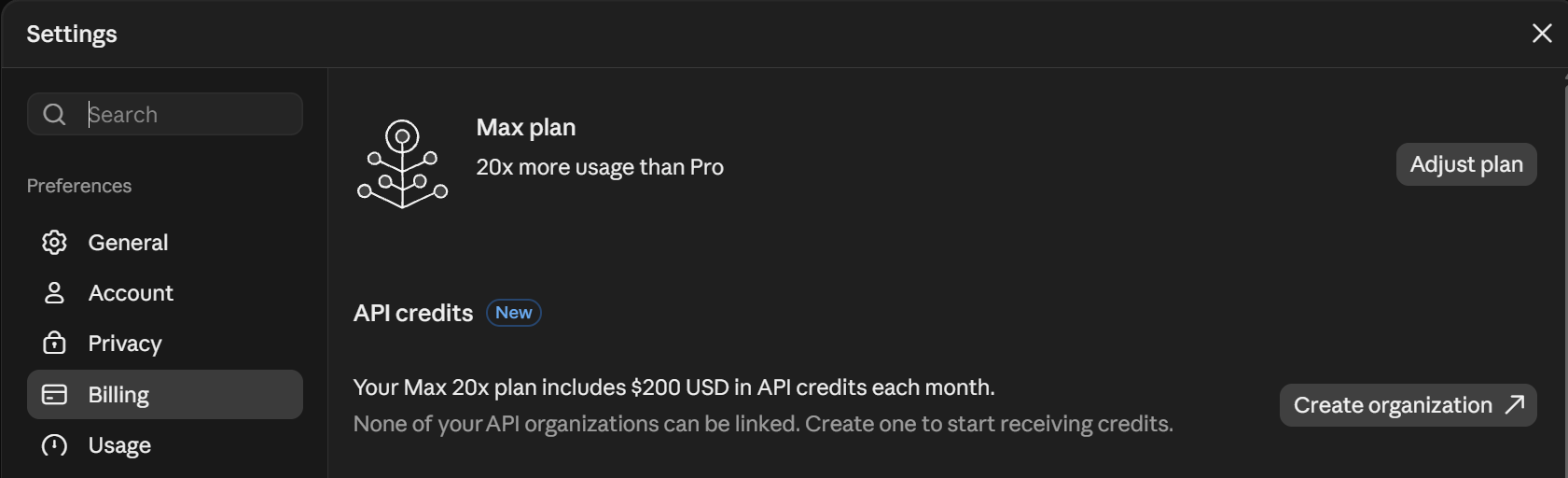
Settings > Billing on claude.ai, when no Console organization can be linked yet. - Choose Link organization and pick the organization that gets the credits. You can link only one, and only support can change it later, so pick the one you’ll build in.
- Accept the credit terms and confirm. The credits land in that organization’s balance at platform.claude.com. No card needed.

Settings > Billing in the Claude Console lists each credit grant, what it covers and when it expires.
Don’t have a Console organization yet?
- Choose Create organization in the API credits section, or go to platform.claude.com.
- Sign in with the same email you use on claude.ai. Google, Microsoft and email sign-in all work.
- Fill in the short setup form: the organization’s name and type, your country, and what you plan to build. Then choose Complete setup.
- Go back to Settings > Billing on claude.ai and choose Link organization.
One email can create only one Console organization. To link one, you need to be its Owner, Admin or Billing member.
Use the credits in Claude Code
The credits don’t pay for everyday Claude Code sessions. They do pay for claude -p, Claude Code’s non-interactive mode, when it runs with an API key from the linked organization.
- Create an API key. In the Claude Console, open API keys, choose Create key, then Continue with an API key. Give it a name, choose Default workspace as its scope, create it, then copy the key and keep it private.

API keys in the Claude Console, with Create key at the top right. - Give the key to Claude Code for this terminal.
# macOS or Linux export ANTHROPIC_API_KEY="sk-ant-..." # Windows PowerShell $env:ANTHROPIC_API_KEY = "sk-ant-..." - Run Claude Code with -p. With
-p, Claude Code always uses the key when it’s set, so the run is billed to the linked organization and spends your monthly credits first.claude -p "Summarize what this repository does"
Interactive sessions, the IDE extensions, the desktop app and the GitHub Action count as Claude Code usage, so the credits don’t cover them, even with -p. If you start claude with the key set, it asks once whether to use the key: say no to stay on your Max plan.
Good to know
- Use them or lose them. Unused credits expire at the end of each billing cycle.
- They’re spent first, before any credits you bought.
- When they run out, API calls stop until next month, unless you’ve bought credits or turned on auto-reload. Nothing is charged to your Claude plan.
- They don’t change your plan’s limits in Claude or Claude Code.
- Upgrading from Max 5x to 20x adds prorated credits straight away.
Sources: Anthropic: Monthly API credits for Max and Team plans · Anthropic: Create a separate Console organization · Claude Code docs: Authentication, checked 24 Oct 2026. Screenshots taken 24 Oct 2026.
See what else each Claude plan includes.
This site is not affiliated with, endorsed by or sponsored by Anthropic.