How to claim the API credits that come with ChatGPT Pro
ChatGPT Pro includes $100, $200 or $500 a month to spend on the OpenAI API, matching the plan’s price. To activate the benefit, link an API organization you own.
Paste it into Codex for step-by-step help.
How to claim them
- Wait 7 days. Your ChatGPT Pro subscription must be active, paid and at least seven days old. Free trials and complimentary subscriptions do not qualify.
- Use the same email. Sign in to ChatGPT and platform.openai.com with the same email address. You must own the ChatGPT subscription and the API organization that receives the credits.
- Open ChatGPT in a browser. At chatgpt.com, open Settings > Billing, then find the API credits benefit and start the claim flow.
- Review the receiving organization. If you own several eligible API organizations, choose the one that should receive the credits. Contact support if you later need to change the linked organization.
- Confirm to activate the benefit. In the linked organization’s Billing page on platform.openai.com, check for “ChatGPT subscription linked”. No payment method is required to use available API credits.
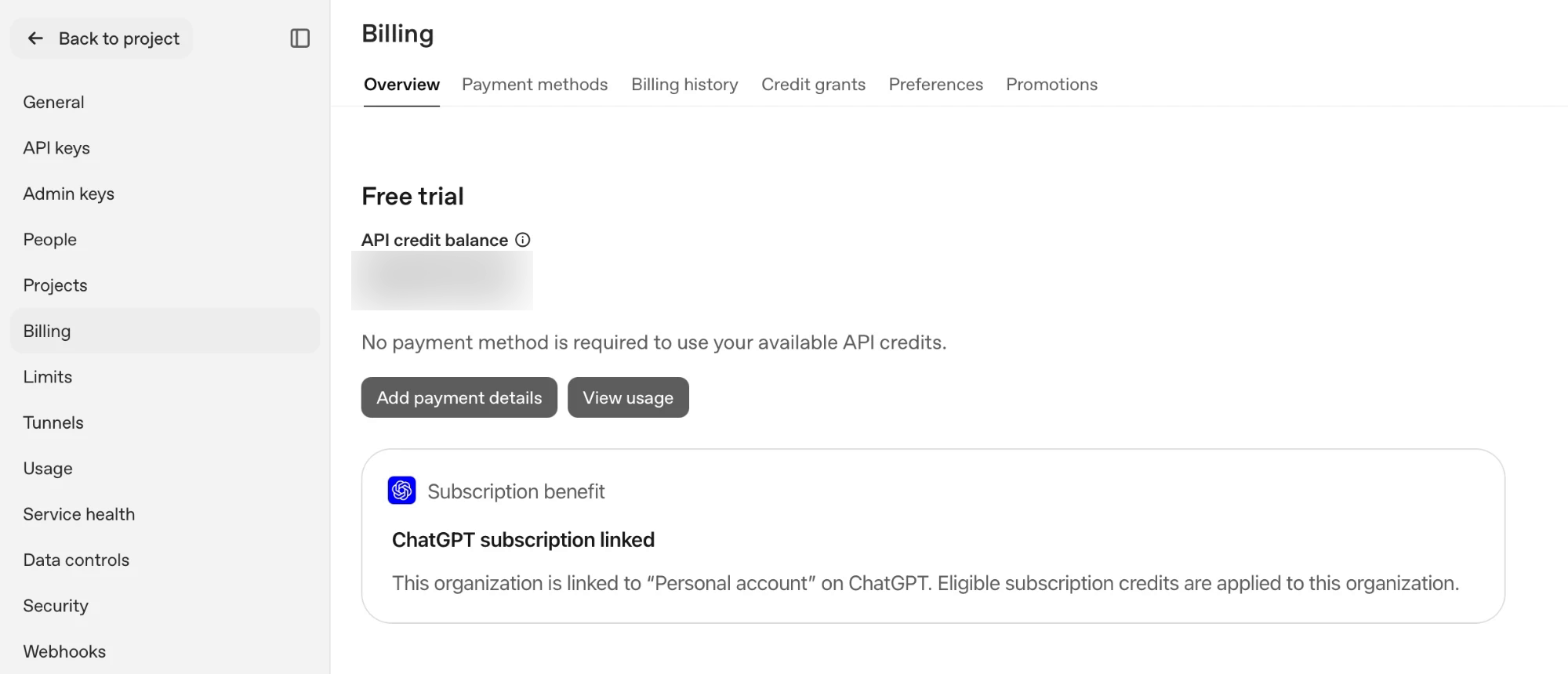
Billing overview on platform.openai.com once the benefit is active, with the balance blurred.
You can also start at platform.openai.com: choose an organization you own, open Billing, find the API credit benefit, select your eligible subscription and confirm.
Use the credits with the OpenAI API
These credits cover paid API Platform usage billed to the linked organization, including the Responses, Agents, Decisions, GPT-Live, Realtime and Images APIs, plus built-in tools and their usage and storage charges.
OpenAI’s Codex restriction. OpenAI says: “Codex usage through API keys is not supported by this benefit.” Keep Codex signed in with ChatGPT for subscription use; use these credits for eligible API requests.
- Create an API key. On platform.openai.com, select the linked organization, open API keys and choose Create new secret key. Keep it private and enter it only in your local terminal.

API keys on platform.openai.com, with Create new secret key at the top right. - Make a Responses API request. Replace
sk-...locally with your key. Use a model available to the linked organization; this example usesgpt-6.1-sol.
macOS or Linux
api_credit_key="sk-..."
curl https://api.openai.com/v1/responses \
  -H "Authorization: Bearer $api_credit_key" \
  -H "Content-Type: application/json" \
  -d '{"model":"gpt-6.1-sol","input":"Reply with one short greeting."}'
unset api_credit_key
Windows PowerShell
$apiCreditKey = "sk-..."
$apiCreditBody = @{
  model = "gpt-6.1-sol"
  input = "Reply with one short greeting."
} | ConvertTo-Json
Invoke-RestMethod -Method Post `
  -Uri "https://api.openai.com/v1/responses" `
  -Headers @{ Authorization = "Bearer $apiCreditKey" } `
  -ContentType "application/json" `
  -Body $apiCreditBody
Remove-Variable apiCreditKey
Remove-Variable apiCreditBody
Good to know
- Use them within the cycle. Unused credits expire at the end of each billing cycle and do not roll over.
- The first grant is prorated. It covers the time left in your current subscription billing cycle.
- They are spent first. Your organization uses free API credits before purchased API credits.
- When the balance is empty. API requests fail with HTTP
429and error codecredit_balance_exhaustedwhen no credits remain. Add paid API credits in Billing or turn on Auto Recharge to continue. - Your plan limits stay the same. These credits do not increase ChatGPT or signed-in Codex usage limits.
- Upgrading Pro can add credits. The extra grant is prorated for the rest of the cycle; later grants match the new plan’s allowance, up to $500 per cycle.
- Downgrading removes the link. If you move to Plus, Go or Free, the API organization link is removed at the end of the billing cycle.
- Cancelling keeps issued credits. Credits already issued remain available until they expire.
Source: OpenAI: API credits for ChatGPT subscribers, checked 30 Oct 2026. Screenshots taken 30 Oct 2026.
See what else each ChatGPT plan includes.
This site is not affiliated with, endorsed by or sponsored by OpenAI.